

Why are parents receiving “low lunch balance” alerts?
The low lunch balance notification is an automatic email/app notification triggered when money in a student’s lunch account drops below a certain threshold. TeacherEase allows parents to control their own settings for this notification.
Parents may wish to disable these notifications since ALL students receive free school lunch and breakfast meals. However, we recommend that parents/guardians simply change the threshold to $0.00, in case the student owes money after purchasing an additional milk or other à la carte item.
To control these notifications:
Log in to your TeacherEase account and navigate to MISCELLANEOUS > COMMUNICATION PREFERENCES
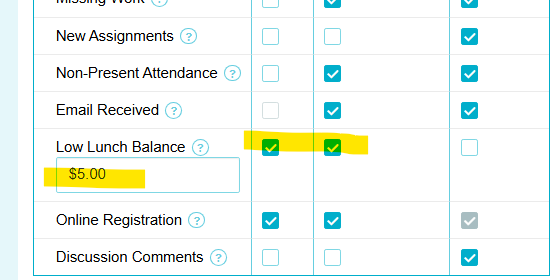
To DISABLE all notifications, UNCHECK the boxes beside “Low Lunch Balance”
If you choose to keep the notifications on in case your child purchases an a la carte item, keep the notification boxes checked, but change the “Low Balance Threshold” to $0.00
Be sure to SAVE your changes
If you have any questions, please feel free to call the school office or you can email Katie the Tech Lady: kmonroe@signalhill181.org